Category: Dynamics 365
-
Dynamics 365 – Use Upsert to Create or Update Records
The content explains how to use the Upsert operation in Dynamics 365 to efficiently manage data integration without manually checking if records exist. Upsert simplifies processes by automatically updating existing records or creating new ones. It supports bulk operations, alternate keys, and offers examples in C# and JavaScript for implementation.
-
Dynamics 365 – Creating and Calling Custom APIs
Custom APIs in Dynamics 365 enable the creation of custom business logic, facilitating integration with Power Automate and external systems. This guide outlines the steps to register a Custom API in Dataverse, link it to a plugin, and configure input/output parameters. A practical example of copying user roles within Dataverse…
-
Dynamics 365 – How to Start a Plugin Project with PAC CLI
This article explains the process of quickly creating a new Dynamics 365 Plugin project using PAC CLI. It covers the installation of PAC CLI via .NET Tool, project setup, and the steps to create and deploy a plugin. Key commands and configurations for generating early bound models are also detailed…
-
Dynamics 365 – Disable Record Creation in Timeline
This post discusses a method to restrict users from manually creating records in specific table types on the timeline in PowerApps. By accessing the form designer and adjusting the timeline control’s properties, users can uncheck the “Create directly from timeline” option for certain activity types to block their registration.
-
Dynamics 365 -Custom Filter for Subgrids with setFilterXml
The post discusses the use of the setFilterXml method in Dynamics 365 for applying custom filters to subgrids. It highlights accessing the subgrid control, retrieving existing FetchXml, modifying queries if needed, and using setFilterXml for custom logic. Note that this method is unsupported, so caution is advised.
-
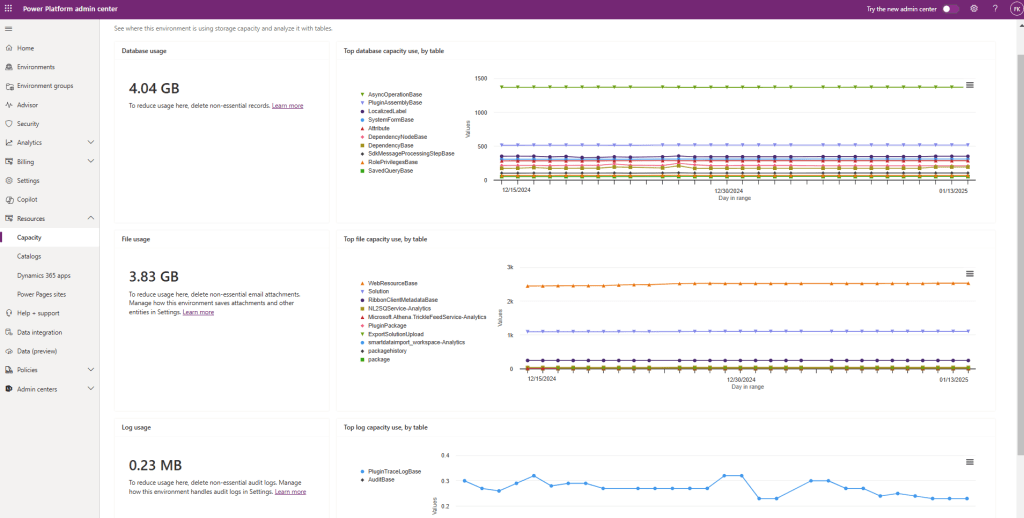
Dynamics 365 – How to Reduce Used Capacity
To maintain optimal performance in Dynamics 365, regularly monitor environment capacity and identify resource-consuming tables and components. Best practices include capacity usage monitoring, log cleanup, data archiving, proper audit history configuration, and removal of unused web resources, plugins, and solutions. These actions prevent resource exhaustion and streamline management.
 Crm Minds