Tag: Dynamics CRM
-
Dynamics 365 -Custom Filter for Subgrids with setFilterXml
The post discusses the use of the setFilterXml method in Dynamics 365 for applying custom filters to subgrids. It highlights accessing the subgrid control, retrieving existing FetchXml, modifying queries if needed, and using setFilterXml for custom logic. Note that this method is unsupported, so caution is advised.
-
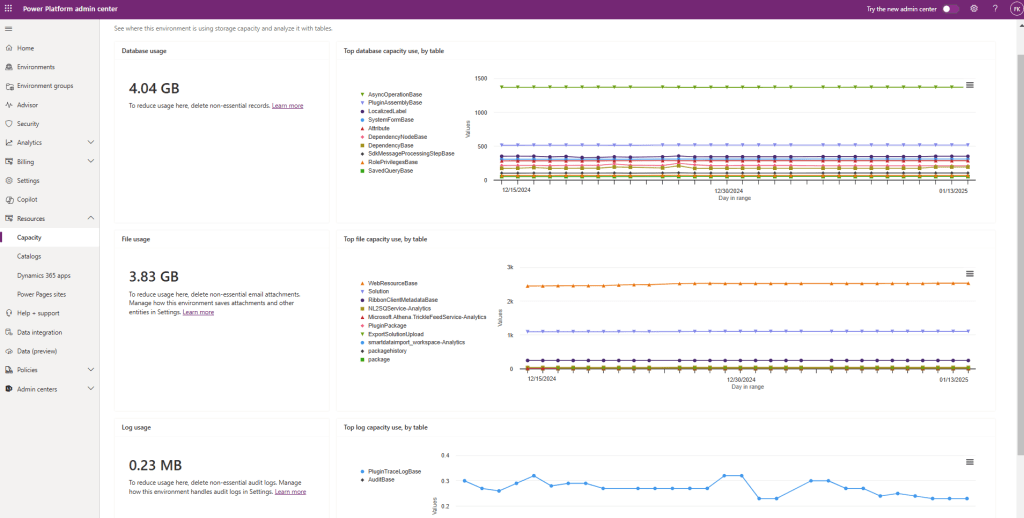
Dynamics 365 – How to Reduce Used Capacity
To maintain optimal performance in Dynamics 365, regularly monitor environment capacity and identify resource-consuming tables and components. Best practices include capacity usage monitoring, log cleanup, data archiving, proper audit history configuration, and removal of unused web resources, plugins, and solutions. These actions prevent resource exhaustion and streamline management.
-
Copy PowerApps/Dynamics 365 Solutions with PowerShell
Copying solutions between environments is a common task in Dynamics 365 and Power Apps projects if you do your deployments via DevOps pipelines. In this post, I will explain how to accomplish this task with PowerShell. For connecting to Dataverse via PowerShell, you can check my other post https://crmminds.com/2024/07/05/connect-to-dataverse-with-powershell/ Why…
-
Dynamics 365 – How to Readonly Fields on Business Process Flow
In Dynamics 365, locking fields on a Business Process Flow (BPF) prevents users from editing certain fields. Two JavaScript functions are shared: one for locking BPF fields and another for locking both form and BPF fields simultaneously. The header_process prefix is used to access BPF fields. For more insights, visit…
-
Dynamics 365 – Hide All Controls for an Attribute
The post discusses managing multiple controls associated with a single attribute in Dynamics 365 forms. It emphasizes the need to dynamically show or hide these controls based on conditions, providing examples for hiding a single control and hiding all controls for an attribute. Efficient management is crucial for a smooth…
-
How to Bulk change Owner of Power Automate Flows
When a user with critical Power Automate flows leaves, it can cause connection reference issues, disrupting business processes. To solve this, owners or admins can change flow ownership in bulk using Advanced Find. This maintains operational workflows and allows for business continuity even after the original owner leaves. For more…
 Crm Minds