In Part 1 of this post we created our SharePoint add-in and added permissions to it. We now can start using the SharePoint Online API.
With using PnP Framework library
Add the PnP Framework library nuget package to use the below code: https://www.nuget.org/packages/PnP.Framework
This file contains hidden or bidirectional Unicode text that may be interpreted or compiled differently than what appears below. To review, open the file in an editor that reveals hidden Unicode characters.
Learn more about bidirectional Unicode characters
| string siteUrl = "https://contoso.sharepoint.com/sites/demo"; | |
| using (var cc = new AuthenticationManager().GetACSAppOnlyContext(siteUrl, "[Your Client ID]", "[Your Client Secret]")) | |
| { | |
| cc.Load(cc.Web, p => p.Title); | |
| cc.ExecuteQuery(); | |
| Console.WriteLine(cc.Web.Title); | |
| }; |
With using Postman
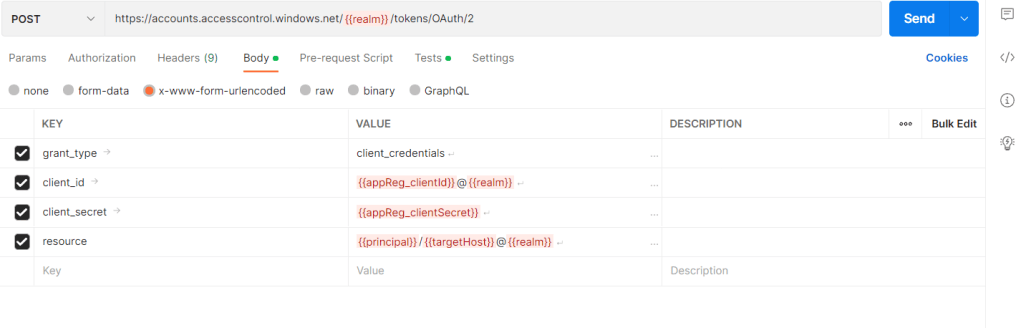
| appReg_clientId | Your SharePoint add-in Client ID |
| realm | Your SharePoint Tenant ID |
| principal | 00000003-0000-0ff1-ce00-000000000000 |
| targetHost | <domain_name>.sharepoint.com |
With using .NET
This file contains hidden or bidirectional Unicode text that may be interpreted or compiled differently than what appears below. To review, open the file in an editor that reveals hidden Unicode characters.
Learn more about bidirectional Unicode characters
| private static void GetAccessToken() | |
| { | |
| try | |
| { | |
| SHAREPOINT_TOKEN = string.Empty; | |
| WebRequest request = WebRequest.Create("https://accounts.accesscontrol.windows.net/" + TENANT_ID + "/tokens/OAuth/2"); | |
| request.Method = "POST"; | |
| string postData = "grant_type=client_credentials" + | |
| "&client_id=" + WebUtility.UrlEncode(CLIENT_ID + "@" + TENANT_ID) + | |
| "&client_secret=" + WebUtility.UrlEncode(CLIENT_SECRET) + | |
| "&resource=" + WebUtility.UrlEncode(SHAREPOINT_RESOURCE_ID + "/" + SHAREPOINT_DOMAIN + "@" + TENANT_ID); | |
| _logger.LogInformation($"postData: {postData} "); | |
| _logger.LogInformation("GetBytes: postData "); | |
| byte[] byteArray = Encoding.UTF8.GetBytes(postData); | |
| request.ContentType = "application/x-www-form-urlencoded"; | |
| request.ContentLength = byteArray.Length; | |
| _logger.LogInformation("GetRequestStream: request "); | |
| Stream dataStream = request.GetRequestStream(); | |
| dataStream.Write(byteArray, 0, byteArray.Length); | |
| dataStream.Close(); | |
| _logger.LogInformation("Calling: request.GetResponse "); | |
| using WebResponse response = request.GetResponse(); | |
| _logger.LogInformation("GetResponseStream: response "); | |
| dataStream = response.GetResponseStream(); | |
| StreamReader reader = new StreamReader(dataStream); | |
| string responseFromServer = reader.ReadToEnd(); | |
| reader.Close(); | |
| dataStream.Close(); | |
| _logger.LogInformation($"responseFromServer: {responseFromServer} "); | |
| const string accessToken = "access_token\":\""; | |
| int clientIndex = responseFromServer.IndexOf(accessToken, StringComparison.Ordinal); | |
| int accessTokenIndex = clientIndex + accessToken.Length; | |
| SHAREPOINT_TOKEN = responseFromServer.Substring(accessTokenIndex, (responseFromServer.Length – accessTokenIndex – 2)); | |
| } | |
| catch (Exception ex) | |
| { | |
| _logger.LogError(ex.Message); | |
| throw; | |
| } | |
| } |
 Crm Minds
Leave a reply to SharePoint Online API – Get Access Token with Client ID and Secret – Part 2 – Microsoft Dynamics 365 Community Cancel reply