-
Microsoft Dynamics 365 Business Central is a cloud-based business management solution for small and medium-sized businesses, offering integrated financial management, sales and service tools, project and supply chain management. It seamlessly integrates with other Microsoft applications, provides customization options, supports multiple languages and currencies, and offers a virtual assistant for contextual guidance and proactive suggestions.
-
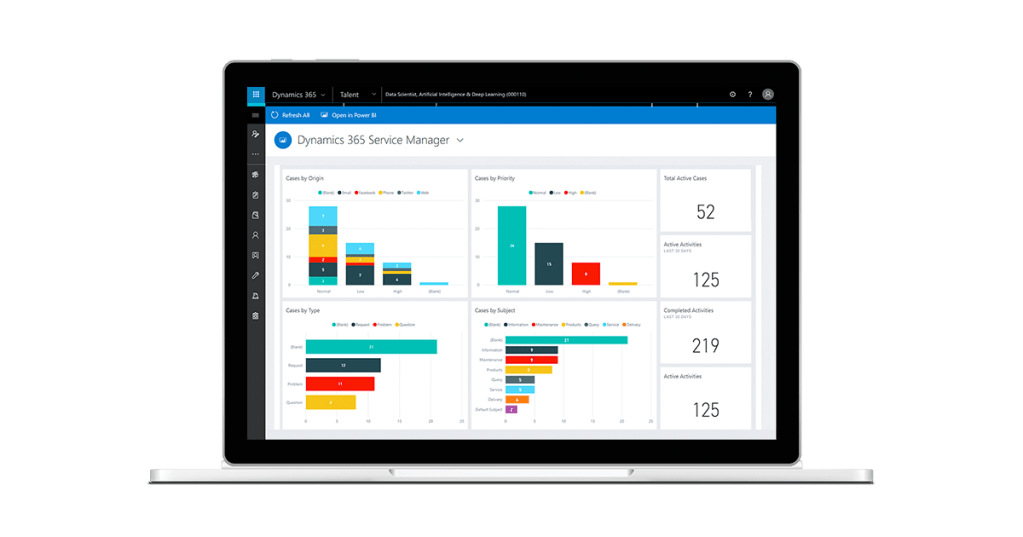
Dynamics 365 Customer Service provides personalized, omnichannel support to manage cases efficiently, empower agents with unified access to customer data, engage customers through various channels, and leverage AI for insights and optimizations. Its key capabilities include case management, omnichannel engagement, and AI-driven analytics, offering a comprehensive solution for exceptional customer service.
-

Dynamics 365 Sales is a powerful cloud-based application from Microsoft, offering seamless integration with other tools and features for optimized sales performance. It provides automation, real-time insights, and personalized customer interactions. The platform helps increase revenue, enhance customer satisfaction, reduce costs, and innovate sales strategies. Following best practices is essential for effective utilization.
-
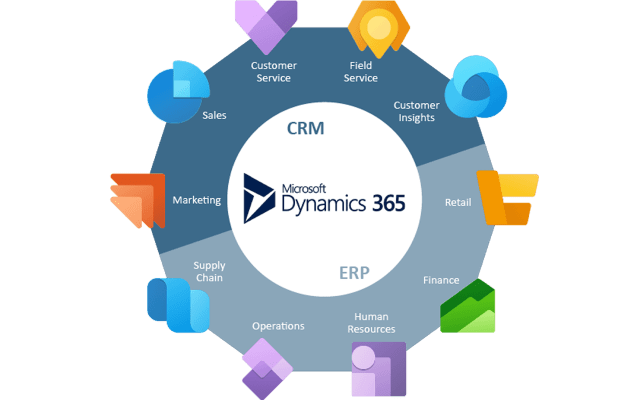
Dynamics 365 is a cloud-based platform offering applications for businesses of all sizes and industries. It enables streamlined processes, improved customer relationships, and insights from data. With AI and ML, it provides smart recommendations and predictions. Applications include Sales, Marketing, and Customer Service, each offering various tools and insights to enhance business operations and customer…
-
This blog post outlines the process of customizing app colors for model-driven apps. It involves creating an XML file with color selections for different app header states, publishing this file as a web resource, and adding an override setting to the app settings. The post also discusses the color contrast requirements for accessibility and provides…
-
Environment variables are a feature of Power Apps that allows you to store and reuse values across your apps and flows.


-
Subscribe
Subscribed
Have a WordPress.com account? Log in now.

